APK, 20.5 MB. Android 7.0 and up. SHA-256: 1187a03bb5f91ba867b37a684e7e4015b27f75e63ef3008bb074d2c5f3323254
Android will ask you to allow installing from your browser, because GhostIDE is not on the Play Store yet. That prompt is expected. The hash above is printed here so you can check the file you downloaded is the studio's build.
On a computer instead? The desktop edition runs from source from the public GitHub repo: clone it, run ./start.sh, and open 127.0.0.1:5173. It needs Python 3.11 or newer and a llama.cpp build. Questions: [email protected]
Installable packages for Windows, macOS, and Linux with a one-command install. The workspace lives in a GhostIDE folder in your home directory, and it can also run from source with Python 3.11 or newer.
Version 3.10.1
Windows, macOS, Linux
Model is a separate in-app download
Run it from source instead: Python 3.11 or newer, start it with ./start.sh, open 127.0.0.1:5173, and press Start model.
Start in three steps
1. Email the studio for your OS package.
2. Run the one-command install.
3. Download the 7B model in Settings and press Start model.
The same editor, chat, agent, and tools on both editions.
01
The editor
CodeMirror 6 for JavaScript, TypeScript, Python, HTML, CSS, JSON, and Markdown. Tabs, split view, multi-cursor, live syntax diagnostics as you type, code folding, find and replace with regex and dry-run previews, a command palette, and Quick Open. Local history with restore, autosave draft recovery, and session restore down to cursor positions.
02
Ghost Chat
Streaming chat with context modes: the current file, a smart slice of its dependency web, or a project slice, with a token meter so you can see what the model is reading.
03
Agent mode
The agent plans and executes multi-file changes one action at a time. Writes stage for your review with diffs, and nothing lands until you approve it. Staged code is syntax-checked before it can be called done, runs can pause mid-run, and every run leaves a full replayable trail.
Step budgets you control, a scratchpad the agent keeps while it works, read-only EXPLORE sub-runs it can dispatch, bounded self-repair rounds when staged code fails its syntax check, and follow-ups you can queue mid-run.
04
Git built in
A complete daily client: status with ahead and behind, stage, commit, branches, stash, tags, amend, worktrees, blame, and a log with a commit viewer. The agent's own Git surface is read-only by construction.
05
Tests and verify
Discover and run Python and Node tests: the whole suite, one file, or a single test by name, then re-run only the failures. The verify pipeline reports evidence levels: Executed, Claimed, and Gaps, never a silent pass.
06
Ecosystem and platform
29 bundled Ghost tools, including GhostSlice, GhostMCP, GhostApprove, GhostIndex, and GhostReview, execute for real against your workspace. Project templates, a sandboxed plugin system, pair mode so a second device can join the workspace with a pairing token (viewers are read-only), voice coding, and optional encrypted backups.
How Ghost Chat reads your project
Current file
Just the file you are in.
Smart slice
The file's dependency web, reason-tagged and budget-packed.
Project slice
Signatures only, or full text.
The token meter shows what the model is about to read before it reads it.
Every one of them executes for real against your workspace, and the bundle only builds when all 2,871 of their tests pass.
GhostApprove
GhostAtlas
GhostConsole
GhostConvert
GhostData
GhostDeps
GhostDocs
GhostEnv
GhostExposure
GhostFixture
GhostHandoff
GhostIndex
GhostLeads
GhostLedger
GhostLift
GhostLogs
GhostMCP
GhostMCPDoctor
GhostPrimer
GhostRE
GhostRecall
GhostRecipes
GhostReplay
GhostReview
GhostSchema
GhostScope
GhostShard
GhostSlice
QuoteShot
29 tools, 2,871 passing tests.
The model store
The AI is Qwen2.5-Coder-Instruct, downloaded in the app. Every download is exact-size and SHA-256 verified before use, and resumable.
Four sizes of Qwen2.5-Coder-Instruct: the 0.5B Sprinter (380 MB download, about 0.7 GB of RAM while running) up to the 7B Max (4.68 GB download, about 5.5 GB of RAM). The 1.5B Balanced is the phone default and the 7B Max is the desktop default. The full table is in the guides: Pick a model for GhostIDE.
The desktop package contains no model; the 7B is an optional in-app download, and models can be switched at any time.
Which model should I pick?
On a phone: the 1.5B Balanced (0.94 GB) is the phone default. The 3B Smarter (1.93 GB) sits between it and the largest model.
On a desktop: the 7B Max (4.68 GB) is the desktop default.
Short on space: the 0.5B Sprinter (380 MB) is the smallest download in the store.
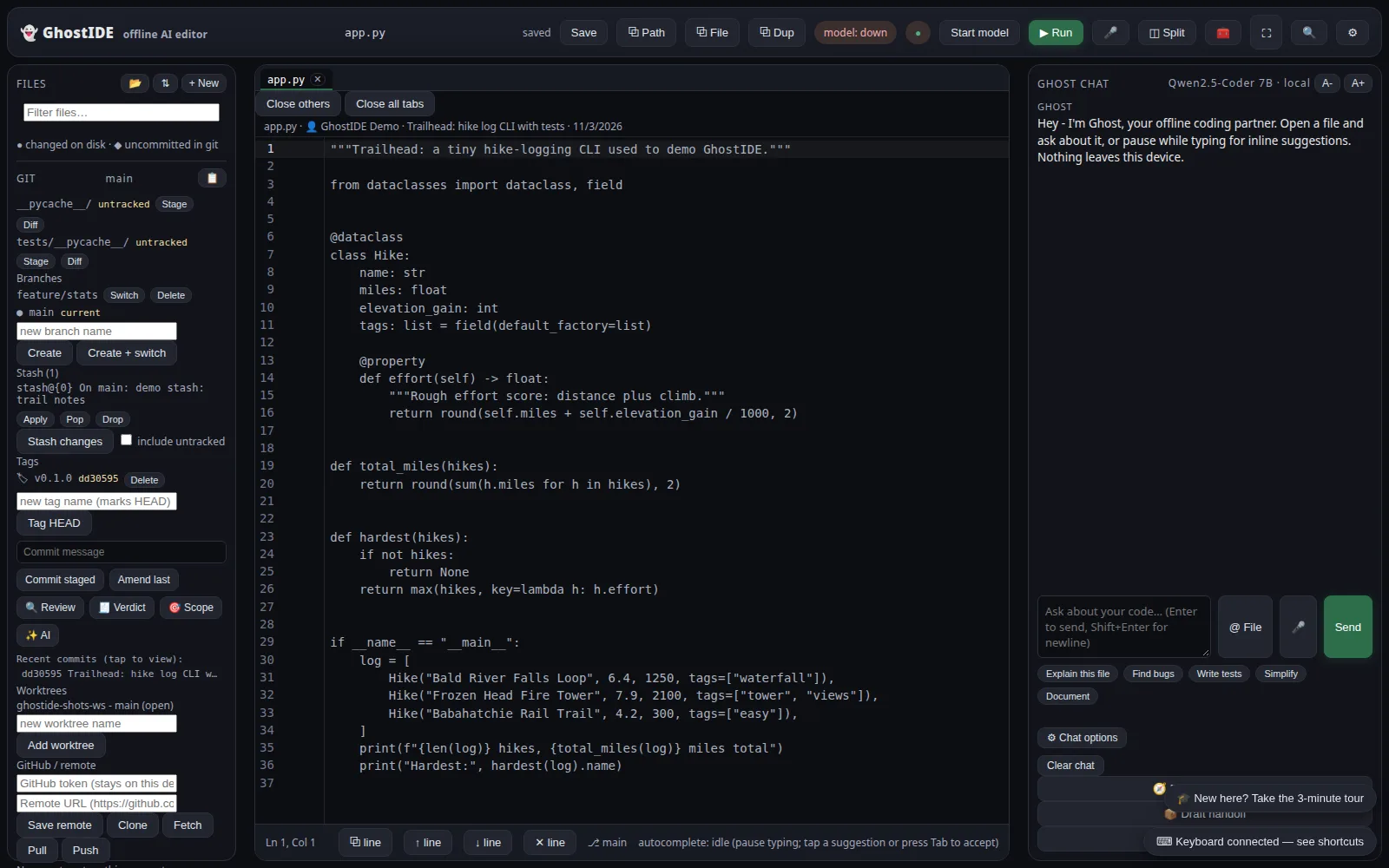
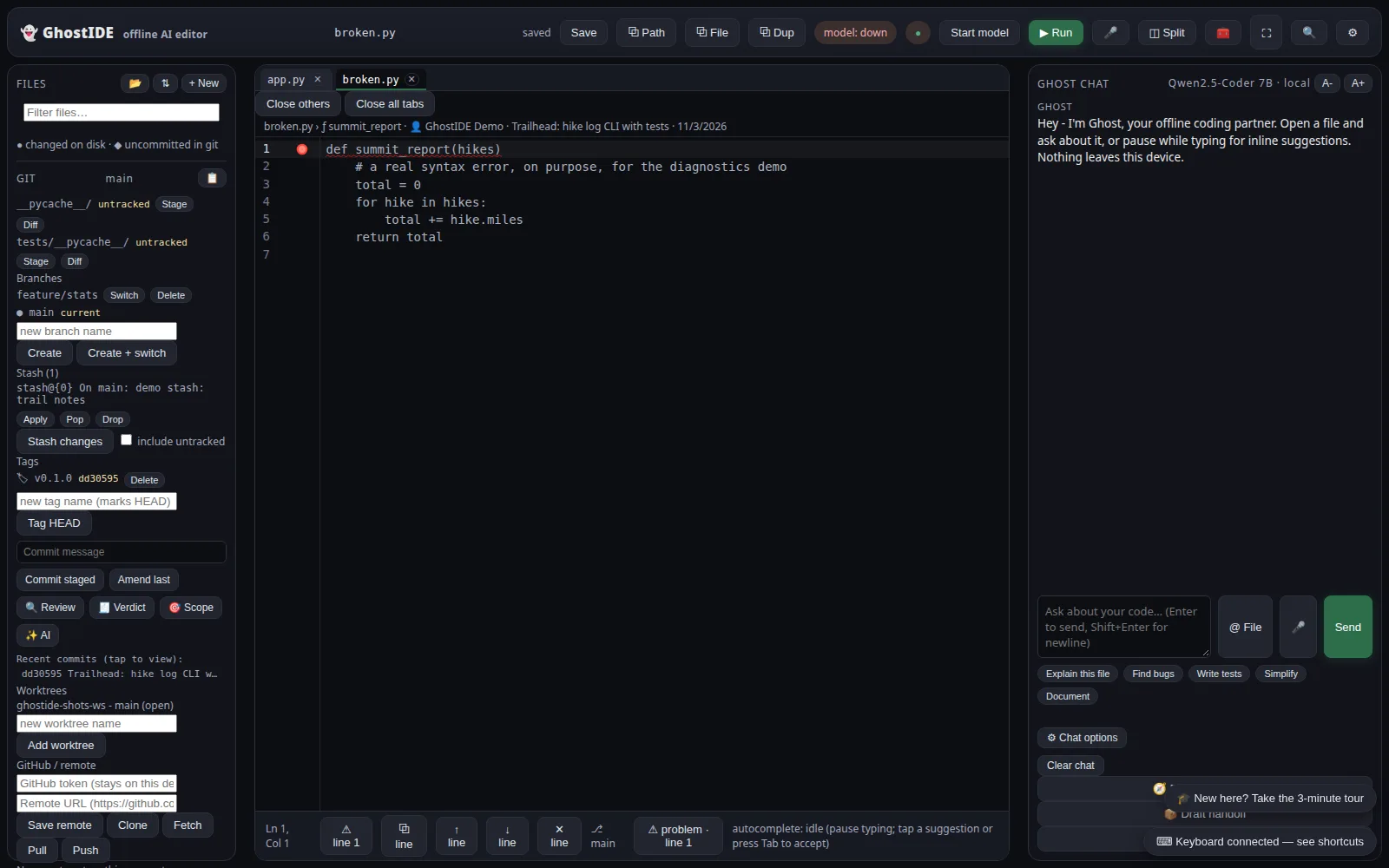
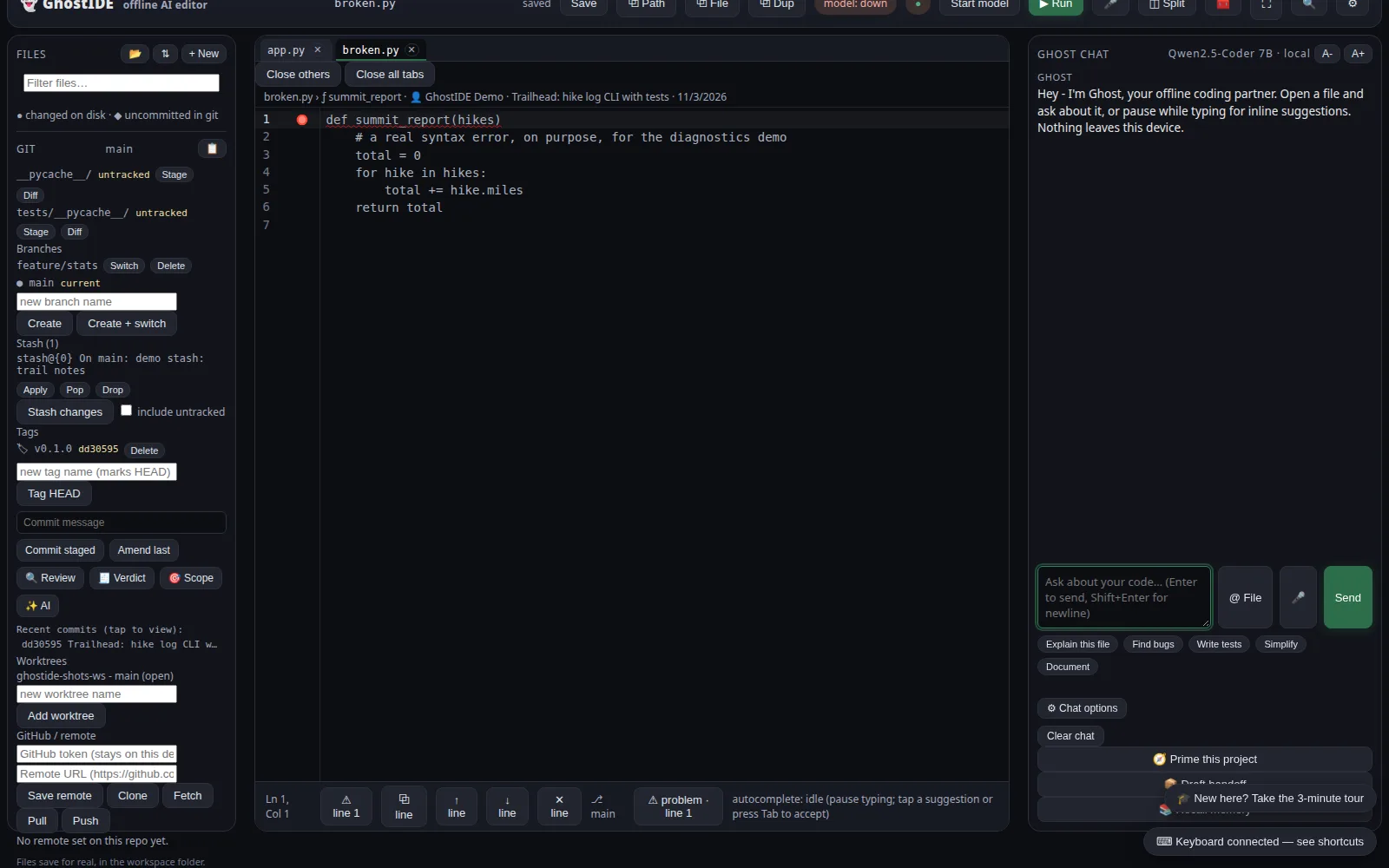
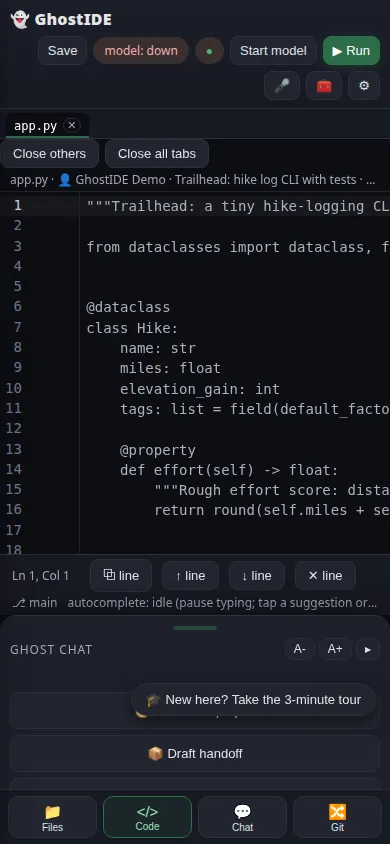
Screenshots from the actual desktop build, taken with the bundled demo project open: Trailhead, a small hike log CLI with tests. Nothing here is a mockup. The top bar shows the model as down because no model was started for these shots; the editor, the Git panel, the diagnostics, and the chat layout are all live.
The editor with app.py open. Git panel on the left with branches, stash, tags, and recent commits; Ghost Chat on the right.broken.py carries a deliberate syntax error, the missing colon on line 1. The gutter mark and the problem chip in the status bar appear as you type, no model needed.Ghost Chat beside the code, with one-tap actions under the input: explain this file, find bugs, write tests, simplify, document.The same app in its phone layout, with Files, Code, Chat, and Git on the bottom bar.
GhostIDE is developed in audited campaign cycles: twenty improvements, then twenty adversarial audits against a standing checklist, released in batches of five. Four gates stand between a change and a shipped build.
Harness suite. 137 files pinning routes, rails, and regressions.
Bundle gate. The built web bundle is executed headlessly, so a stillborn build cannot ship.
Live probes. Fixture workspaces are probed live, including a canary sweep where a planted API key must appear in zero route responses.
Ecosystem gate. Every bundled tool's own tests run before a build may include it: 2,871 tests at the last generation check.
Cold start, measured in the harness: the editor constructs in about 0.42 seconds, and the desktop server answers health in about 0.19 seconds.
Under the hood, the desktop backend is Python standard library only, with a built-in debugger bridge.
The studio publishes the app's known limits in the repo. Here is the plain version.
The phone models are small. They write good small functions and decent autocomplete; multi-step reasoning is where they run out of road. The desktop 7B is the reference experience.
Answers can be wrong with confidence. There is no cloud model checking the work; the run panel and your eyes are the safety net.
Very large files, 200 KB and up, can make the editor sluggish, especially on the phone. Work file by file for big artifacts.
LAN sync is a whole-workspace overwrite by filename: no merge and no conflict detection. Pull and push deliberately, not casually.
Format on save needs black, ruff, or prettier installed on the desktop. Without one, the IDE says so instead of pretending.
GhostIDE collects nothing. No accounts, no analytics, no advertising, no tracking, and no studio server for data to go to.
What stays on your device: your projects and files, the model files you download, and your settings, chat history, snippets, and local file history. Deleting the app deletes this data with it.
Because the editor, chat, agent, and models all run on your device, your code stays on the device too. There is no cloud behind GhostIDE and no account to sign into, so your projects, chats, and files go nowhere unless you share or export them yourself.
It also means the editor works without a connection. On a plane, on a job site, or anywhere the signal does not reach, GhostIDE opens and runs the same as it does at your desk.
No. The editor, chat, agent, and models all run on your device. The internet is only used when you choose to download a model or check for updates.
Does my code leave my device?
No. There is no cloud behind GhostIDE and no account to sign into. Your projects, chats, and files stay on the device unless you share or export them yourself.
Can the agent change my files without asking?
No. Agent writes stage as diffs for your review, and nothing lands until you approve it. Its Git surface is read-only by construction.
How do updates work?
The app can check the repo for a newer version and report what it finds. It never downloads or installs an update by itself.
What does pair mode do?
A second device can join your workspace with a pairing token. Tokens expire in 12 hours, and viewers are read-only.
Neither edition is in an app store yet. Android is a direct download from this page. Desktop runs from source from the public repo, and the studio can still email a desktop package if you ask.
Before you start
For Android: your phone runs Android 7.0 or later.
You have room for the model you want. Downloads run from 380 MB for the 0.5B Sprinter to 4.68 GB for the 7B Max, as shown in the model table above.
Only for a desktop package by email: an address the studio can send it to.